It can be sometimes difficult to visualise how a font will appear on your website. You also want to make sure you are using a standard, safe web font so it appears the same on all computers that are browsing your website.
Type Tester is one of the tool that lets you compare different fonts and styles on the screen . TypeTester lets you compare multiple fonts and also lets you set the CSS (style sheet) parameters and compare the results http://www.typetester.org/
For anyone new to style sheets and not sure of the correct parameters available try this handy website - CSS Type Set lets Web Designers experiment with various combinations of styles and attributes. http://csstypeset.com/

Tuesday, January 22, 2013

Wednesday, September 19, 2012
What is a CMS Website?
A
Content Management System (CMS) is basically a form of software that resides on a web server and uses a
database to store a large portion of the content that makes up a website. To update the content you login to an administrator area via a web browser. This make it great for website owners as you do not need to learn complicated programming languages to update your website.
Two well know CMS websites are Joomla and Word Press. Usually your web hosting company can install these for you although customising some things can be difficult - it behaves like a template where you really can only change the content.
Both Joomla and Word Press have active communities for trouble shooting and support with a large range of plug-ins for extra functionality.
Thursday, March 29, 2012
Updating Social Networking
Do you find it time consuming to stay on top of updating your social networking? I came across this website last week that will automatically update them all. http://dlvr.it/ will accept a tweet or post and synchronise it to your Twitter, LinkedIn, Facbook, MySpace and Google Buzz accounts.
For more help on managing social networking to market your website contact us.
For more help on managing social networking to market your website contact us.
Wednesday, February 15, 2012
Analysing Your Website Content
Does your website content focus on your customers or yourself? Here is a great calculator to determine if you are customer-friendly or too focused on yourself or your company.
The We We Calculator will count certain words on your site that are key indicators of whether your focus is on the customer or not. It is worth a look!
The We We Calculator will count certain words on your site that are key indicators of whether your focus is on the customer or not. It is worth a look!
Sunday, August 28, 2011
Sustainability Kit Website - Education for Sustainability
After completing the Vocational Graduate Certificate for Education for Sustainability, I have create a website http://www.sustainabilitykit.net.au for teachers and trainers to embed sustainability into vocational courses. The activities in this website can be used to deliver sustainability workshops for accredited and non accredited training. The workshops that can be created out of this website content will give knowledge and skills to improve current workplace processes, procedures and technologies to have more sustainable outcomes.
Wednesday, July 27, 2011
Google+ New Social Networking
Google+ is a new social networking service that's still in a "testing phase." Google are currently analysing, tweaking, adding and possibly removing features during the testing period.
Like Facebook, it's a place to socialize with friends. Like Twitter but unlike Facebook, Google+ makes it possible to follow people who don't follow you, which means you don't have to become fake friends with everyone. And like LinkedIn, it's possible to use Google+ to keep up with a professional network of colleagues and also use it as a social hangout for friends and family.
Google+ introduces "circles." You add friends and colleagues to one or more circles. If you don't put them in one of your circles they will only see what you post publicly.
Sunday, July 10, 2011
Website Keywords
How many words should you have on your homepage to optimise your search engine ranking?
It is a balance between good content that is easy to follow for visitors and multiple keywords that are there for the GoogleBot to find. A website home page needs to be easy for visitors to navigate through and keep them on your site, producing more sales or enquiries. The more words you have the more text there is for GoogleBot to find. I find a good default amount is at least 200 words. The more words there are will help the search engines but make sure your visitors do not get lost!
If your website needs a search engine boost contact us for a quote.
Friday, April 29, 2011
Excel 2010 Charting with Sparklines
One of the new features in Excel 2010 is the ability to create a chart in one cell called Sparklines. They show how a range of data varies and can help people analyse their data and look at trends. Click on the Insert tab and in the Sparklines section choose Line. You will be asked to highlight your range of data and which cell you want the Sparkline chart to appear in.


Sunday, March 13, 2011
Customising the Office 2010 Ribbon
Office 2010 lets you customize the ribbon in all application including Word 2010, Powerpoint 2010, Excel 2010, etc
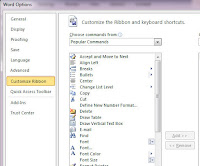 Within each Office 2010 application, you can create a custom Ribbon tab to keep all the features you use most right where you need them. Microsoft Office 2010 lets you group the commands you use most.
 Within each Office 2010 application, you can create a custom Ribbon tab to keep all the features you use most right where you need them. Microsoft Office 2010 lets you group the commands you use most.
- Open any Office 2010 application – Powerpoint 2010, Word 2010, Excel 2010 etc.
- Click the File tab, and then click Options.
- In the Options dialog box, click Customize Ribbon and then click New Tab near the bottom of the dialog box
- In the Choose command from list, select your commands from the default list of Popular Commands, or use the down arrow to select from all commands. Choose the commands you use most, and add each to your new tab by clicking Add. Click Ok when finished
Wednesday, December 29, 2010
Excel VLOOKUP and #N/A
#N/A errors in MS Excel using a VLOOKUP formula can be frustrating. It is actually Excel's way of telling you that the value you are searching for isn't in your table of values. To make it look more appealing use the VLOOKUP together with IFERROR function to return a result such as "Not found" or a blank value.
Thursday, December 2, 2010
Excel Tips and Tricks
Here are some cool Excel tips that will work in 2003, 2007 or the 2010 version of MS Excel;
Enter Today's Date
Click in the Excel formula bar of an empty cell and type Ctrl+; (semicolon) and it will insert the current date.
Debugging Excel Formulas
In the Excel formula bar highlight part of a formula and press the F9 key. Instead of seeing the calculation you will see the value. It will only evaluate the highlighted portion of the formula. To revert it back to the calculation press ESC.
Auto Filling Week Days
Start with a date typed into a cell. When going to auto fill for sequential dates do a right click mouse drag and when you release the mouse it will pop up a menu to change the date fill to WeekDays.

Tuesday, August 3, 2010
Troubleshooting Client Computers
How I wish the saying "It works on my machine!" could be used as a valid excuse for technical problems that occur on different computers. You are never really sure how your website will appear everywhere which is why you need a comprehensive testing plan. I came across a cool tool that can help troubleshoot problems without leaving the office. Support details at http://www.supportdetails.com/ will let your clients email their computer configuration which should help narrow down technical problems.
If you need a quote on troubleshooting technical website problems contact us at http://www.webtechconsulting.com.au
If you need a quote on troubleshooting technical website problems contact us at http://www.webtechconsulting.com.au
Sunday, May 23, 2010
Google Ranking and Site Speed
Google have now released the information that web site speed is now a factor in your google ranking. To get some speed and performance measurements for your website go to www.webpagetest.org. It also lists some optimisation suggestions to improve your web site speed and google rank.
Thursday, April 22, 2010
iPad Peek
The iPad is becoming popular enough for website developers to include it as one of their testing platforms. iPad Peek is a nifty tool that lets you see how any website will be rendered on the iPad. You can switch from landscape to portrait mode but the virtual keyboard and the buttons are just for show. It is not identical to the “real” iPad experience as Flash works and it shouldn’t.
Saturday, March 13, 2010
Search Engine Comparison
Have you ever wanted to see how the major search engines compare when performing a search on the internet. Click here for a site that does a Blind Search Engine comparison http://www.blindsearch.fejus.com/
Unfortunately you cannot localise it for Australia but the resulting list will randomly vary and if you can analyse how your own website is ranking. Make sure you add a local Region/State/Town into your search. Once you vote the search engines will be revealed!!!!
Unfortunately you cannot localise it for Australia but the resulting list will randomly vary and if you can analyse how your own website is ranking. Make sure you add a local Region/State/Town into your search. Once you vote the search engines will be revealed!!!!
Friday, February 5, 2010
The best URL for your website
URL structure is an important SEO factor, so here are some useful guidelines to keep in mind when designing your website.
Homepage (www.mysite.com.au)
When choosing your domain name, try and include your primary keyword somewhere in the name.
Additional Pages (www.mysite.com.au/[keyword])
On additional pages use another major keyword as the directory and filename for this page.
About Us Page (www.example.com/about-[business name])
The about us page is a chance to make sure your website ranks strongly when customers search for your business name. Using the format /about-[businessname] with the business name in file name will help with this.
Following these guidelines is a good way to build your SEO browser ranking for your website.
Tuesday, January 12, 2010
Website Navigation
Website Navigation is a very important part of designing your website. The aim is to give your customers and easy to follow consistent look and feel. When designing your navigation think about the following points.
1. Never let visitors lose your home page
2. If you have too many links consider drop down menus
3. Keep the links consistent on every page
4. Keep them clearly visible above the scroll line
Useful navigation will keep your customers happy and make it easier for them to find information in your website.
Sunday, November 8, 2009
Windows 7
This release of Windows 7 has not been plagued like Vista was. Below are some new improvements and reasons to upgrade.
1. Windows 7 has beter performance than Vista
2. Better search than Vista
3. Should have less compatibility problems with additional hardware and drivers
4. Improved User Account Control - can set it to not report as much as Vista does
5. WordPad and Paint using the "Ribbon" toolbars like Office 2007
Use the Upgrade Advisor to see if your pc has the minimum requirements to run Windows 7.
Tuesday, October 6, 2009
SEO
Here are some simple Search Engine Optimisation (SEO) tricks you can try and use in your website
1. Try and use keyword rich url's and filenames
2. Use keywords in your title tag. This appears in the tab of the browser
3. Use heading tags h1, h2 and h3 with useful keywords
4. Write keyword rich content, but be careful not to make it a difficult reading experience for your visitor.
1. Try and use keyword rich url's and filenames
2. Use keywords in your title tag. This appears in the tab of the browser
3. Use heading tags h1, h2 and h3 with useful keywords
4. Write keyword rich content, but be careful not to make it a difficult reading experience for your visitor.
Wednesday, September 16, 2009
Shared Website Calendar
Does your website need a shared calendar? Using google's free online calendar it is easy to track important events and have them imported into your website. Goto http://www.google.com/calendar to learn more. All you need is a google account!
Get in touch at www.webtechconsulting.com.au for more information.
Get in touch at www.webtechconsulting.com.au for more information.
Subscribe to:
Posts (Atom)